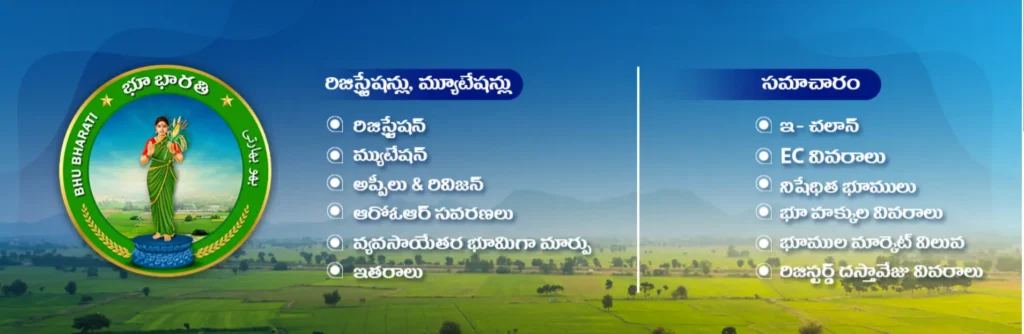
Bhu Bharathi (భూ భారతి) is Telangana’s modern digital land records management system launched by the state’s Revenue Department. This portal serves as the official successor to the Dharani portal, operating under the Telangana Bhu Bharathi (Record of Rights in Land) Act, 2025. The platform provides comprehensive land-related services through a single integrated interface, making land administration more transparent, efficient, and accessible to citizens across Telangana.
What is the Bhu Bharathi Portal? (తెలంగాణ భూ భారతి)
The Bhu Bharathi Portal (bhubharati.telangana.gov.in) is the official Integrated Land Records Management System (ILRMS) of the Telangana State Government. Developed by the Telangana Revenue Department, the system’s primary objective is to enhance governance, transparency, and efficiency in managing all land-related information, directly impacting public welfare.
The launch of the Bhu Bharathi Telangana system marks a strategic policy shift, replacing the centralized Dharani portal to simplify land administration. By consolidating services into fewer, streamlined modules (only about six, compared to 33 previously) and assigning authority back to local Revenue officials (Tahsildars and RDOs), Bhu Bharathi ensures faster and more reliable access to land records for millions of farmers and landowners. This Bhu Bharathi Website serves as a digital hub where citizens can easily check ownership rights, execute transactions, and obtain crucial documents.
Key Benefits of Bhu Bharathi for Citizens:
- Transparency: Eliminates “hidden” record options and provides real-time SMS updates on application status.
- Accessibility: Streamlines land registration, mutation, correction, and market value lookup through a simplified user interface.
- Security: Provides enhanced security of land ownership and reduces the time and cost associated with land transactions.
How to View Bhu Bharathi Land Details Online (భూమి రికార్డుల శోధన)
Accessing your Bhu Bharathi Land Details and land records is a straightforward process available on the official portal, eliminating the need for physical visits to government offices.
Step-by-Step Guide to Land Details Search
To check the land status using traditional identifiers, follow these steps:
- Visit the official Bhu Bharathi Portal: Navigate to https://bhubharati.telangana.gov.in.
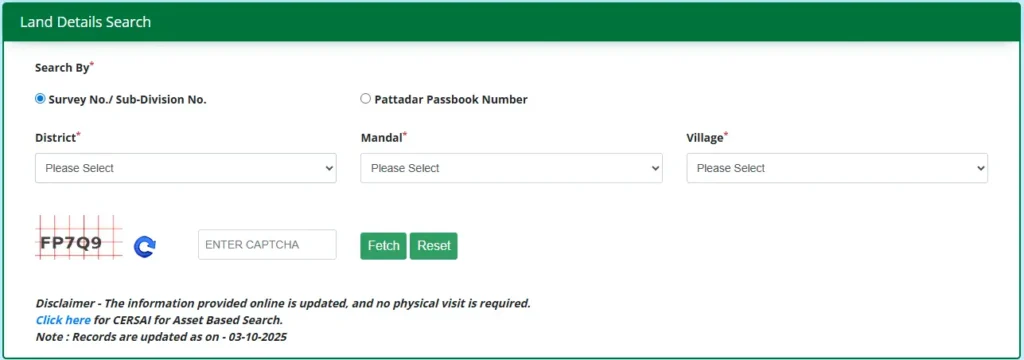
- Select Search Option: Click on the “Land Details Search” option found in the Information Services section.
- Enter Location Details: Select the required District (జిల్లా), Mandal (మండలం), and Village (గ్రామం).
- Choose Search Identifier: You can search using either the Survey No./ Sub-Division No. or the Pattadar Passbook Number (ఖాతా నెం).
- Enter Captcha: Input the displayed Captcha code for verification.
- Fetch Details: Click the “Fetch” button to view your land details, including the owner’s name, land area, land use, and Prohibited Status (నిషేధిత స్థితి). The records are explicitly stated to be updated online (e.g., as of 03-10-2025).
Accessing ROR (1-B) and Pattadar Passbook (PPB)
The 1-B Record of Rights (ROR) is a crucial document confirming land ownership. The Bhu Bharathi Portal Land Details search allows you to easily view and download these documents.
| Document | Search Method | Action |
|---|---|---|
| Record of Rights (ROR or 1-B) | Search using Pattadar Passbook Number or the First four digits of your Aadhaar number. | After the land details appear, click the “ROR” link to view or download the 1-B record. |
| Pattadar Passbook (PPB) & Title Deed | Search using Pattadar Passbook Number or the First four digits of your Aadhaar number. | After details appear, click the “Pattadar Passbook” link to download the digital passbook and title deed. |
Key Services Available on the Bhu Bharathi Website
The Bhu Bharathi Portal provides a two-tiered suite of services for land administration and public access: Transactional and Informational.
Transactional Services (లావాదేవీ సేవలు)
These services require citizen registration and login, enabling the execution of changes to land records.
| Service Category | Supported Transactions & Actions | Regulatory Rule Reference | ||
|---|---|---|---|---|
| Registration Services | Sale (విక్రయం), Gift (బహుమతి), Partition (విభజన), Exchange, Mortgage, Lease, GPA, and Cancellation/Rectification of documents. | Rule 5 (Registration and Mutation) | ||
| Mutation Services | Succession (Section 7): Transfer of land rights based on inheritance or will. | Court Cases & Others (Section 8): Transfer based on judicial orders. | Pending Mutation: Status check for pending applications. | Rule 7 (Succession/Will Mutation) |
| ROR Corrections | Corrections as per Section 4: Correction of errors in the Record of Rights. | Passbook Data Correction: Updating incorrect data in the Pattadar Passbook. | Rule 4 (Rectification of ROR Entries) | |
| NALA Services | Non-Agricultural Land Assessment: Application for converting agricultural land to non-agricultural land use (NALA Application and NALA without PPB). | N/A (Specific workflow provided on portal) | ||
| Appeal & Revision | Citizens can file appeals against decisions made by Tahsildars (to RDO), RDOs (to Collector), and Collectors (to Revenue Tribunal). | N/A (Based on Appellate Structure). |
Informational Services (సమాచార సేవలు)
These services provide critical information for due diligence, financial planning, and application tracking, accessible without needing to complete a transaction.
| Information Service | Purpose and Benefit |
|---|---|
| Market Value of Lands | Check the Government Market Value (మార్కెట్ విలువ) for stamp duty and registration fee calculations prior to a transaction. |
| Prohibited Properties | View the list of lands prohibited from registration (e.g., government lands, litigation disputes). Essential for purchaser safety. |
| eChallan / Application Status | Track the live status (Pending/Approved/Rejected) of all submitted applications (Mutation, NALA, ROR Correction) using the application number or transaction ID. |
| Prohibited Properties | Verify the history of a land parcel by searching for previous sale, gift, or lease documents using the Document Number. |
| Prohibited Properties | View the history of all mortgages, charges, and transactions on a property, crucial for verifying clear title before purchase. |
Bhu Bharathi Best Practices: Essential Workflows and Legal Compliance
To fully utilize the Bhu Bharathi Portal and ensure secure land transactions, understanding the required legal deadlines and application workflows is critical.
Citizen Registration and Login Process (యూజర్ రిజిస్ట్రేషన్)
Transactional services (Mutation, NALA, etc.) require you to first register and log in to the Bhu Bharathi Website.
- Sign Up: Go to the portal, click ‘Login’, and then select the ‘Sign Up’ option to begin the registration process.
- Submit Details: Enter required information (Name, Mobile Number) and click ‘Get OTP’.
- Validate & Register: Enter the received OTP and Captcha code, then click ‘Validate & Register’. Your user account will be created.
- Login: Use your registered Mobile Number and Password on the Login page to access your Citizen Dashboard.
Mandatory eKYC and Slot Booking
Many critical applications, such as General Mutation and Passbook Data Correction, require mandatory eKYC (Electronic Know Your Customer). This verification is often performed at the Meeseva or Bhu Bharati platform and ensures secure identity verification before the application is processed by the department.
Similarly, specific applications like Succession or NALA without Passbook require Slot Booking before departmental processing, which is Step 4 or Step 6 in the respective workflows.
Key Compliance Requirement: ROR Correction Deadline
If you are a person aggrieved by an incorrect entry in the Record of Rights (ROR) or if your details were omitted, you must apply for rectification through the Bhu Bharathi Portal Land Details section.
Crucial Deadline: The application must be made within a strict period of one year from the date of commencement of the Act (April 14, 2025) or from the date the wrong entry was placed in the Bhu Bharati Portal.
Future of Land Administration: Bhudhaar and Support
The Bhu Bharathi Telangana initiative is paving the way for a more robust land system. The government plans to introduce the Bhudaar system, a unique land identification number analogous to Aadhaar, designed to ensure permanent rights and enhance security over land parcels.
This integrated system is a fundamental step toward guaranteeing citizens’ land rights, simplifying transactional workflows, and maximizing transparency, making the Bhu Bharathi Portal a vital resource for all landowners and investors in the state.
Contact and Support Information
For assistance or inquiries regarding the Bhu Bharathi Portal, you can contact the official help desk:
- Bhu Bharathi Portal Help Desk Phone Number: +91 40-29313999
- Operating Hours: 10 AM to 5 PM
Frequently Asked Questions About Bhu Bharathi Portal
What is the difference between Bhu Bharathi and Dharani?
Bhu Bharathi focuses on land record access and information services, while Dharani is the comprehensive land transaction portal. Both are part of Telangana’s integrated land management ecosystem.
How accurate are the land records on Bhu Bharathi?
Land record accuracy depends on regular updates from revenue departments. The portal displays real-time data from government databases, but users should verify critical information with local revenue offices.
Can NRIs use Bhu Bharathi services?
Non-Resident Indians can access information services but may require additional verification for transactional services. Contact the Telangana Revenue Department for NRI-specific procedures.
What if my property doesn’t appear in search results?
Missing property records may indicate outdated surveys or recent acquisitions. Contact your local village revenue officer or district collector’s office for assistance.
Are there any charges for using Bhu Bharathi?
Information services are generally free, while transactional services may involve government fees. Check the official fee structure on the portal or contact revenue offices.